 Etapa
·
What's new
Etapa
·
What's new
What's new in Etapa
Fresh features, quiet fixes, and the odd proper improvement — in plain English. Just what we've shipped and what you'll notice.
An AI bike fit and an event-finder up top. A bucket list of cycling firsts to tick off as you go. A weekly check-in that listens. A hybrid-athlete mode that bends the guide around your other sports. And the rest of the rider's toolkit, in plain English.
One short phone video. Plain-English pointers on saddle, reach, knee angle, and posture.
The AI bike fit reads a short side-on video clip (a few seconds is plenty), highlights what looks off, and gives you concrete things to try: raise the saddle 5 mm, soften the elbows, drop the bars half a spacer. Each finding is tagged with how confident the AI is, so you can tell what's a strong call vs a "could be the angle." If the AI thinks something's outside its scope (a sharp asymmetry, a real pain pattern), it surfaces a "see a fitter" or "see a physio" banner with curated, location-aware suggestions inline.
Free if you're in pain — the quota carve-out kicks in automatically when the rider mentions discomfort. A What we're checking for primer with a short YouTube explainer sits above the recording guidance so you know what we're looking at before you upload.
Tell us the kind of ride you're after — we surface real ones, with the boring stuff worked out.
The event-finder asks seven plain-English questions (vibe, timeframe, where you're based, distance, type, travel modes, anything else) and serves real sportives, audaxes, gravel events, and trips bucketed by Close to home / Worth a trip / Bigger horizons. Every card has the source URL, the distance, the entry fee, the practical "how to get there" line, and a small Mapbox map preview.
Pick specific dates instead of fuzzy timeframes, multi-select scope ("close to home + across Europe"), and tell us which travel modes you're up for (drive / train / fly / cycle). Flag a result as Not interested with a reason — we use it to skip similar events on every future search. Already know the event you want? Type a name ("RideLondon 100", "Étape du Tour") and get the date and source filled in for you. View results on a map when that's the easier read.
Forty cycling firsts to set, track, and tick off as you go — first 40 km, first event, first ride in the rain, first overseas trip.
Goals sits as its own row in the home Your Etapa sheet — a shelf of cycling firsts across three levels (beginner, intermediate, advanced). The defaults cover the obvious ones (first 40 km, first metric century, first sportive, first 100 miles) and the ones nobody talks about (first cafe ride, first ride in the rain, first time eating on the bike, first sunrise ride, first puncture fix by the road). Tap an item to tick it off and add a note about where, when, who with — the note sticks even if you untick later.
Some items carry a How do you do this? prompt — tap and you either get a plain-English tip ("the hardest part of a puncture fix is finding the cause before you put the new tube in…") or a jump straight to the relevant feature (find an event, get a bike fit). You can add your own goals too, anything you want to remember to do this season — they sit alongside the defaults with the same tick-and-note flow.
Two minutes on Sunday — your guide reshapes itself for next week, with what you said after each ride already in there.
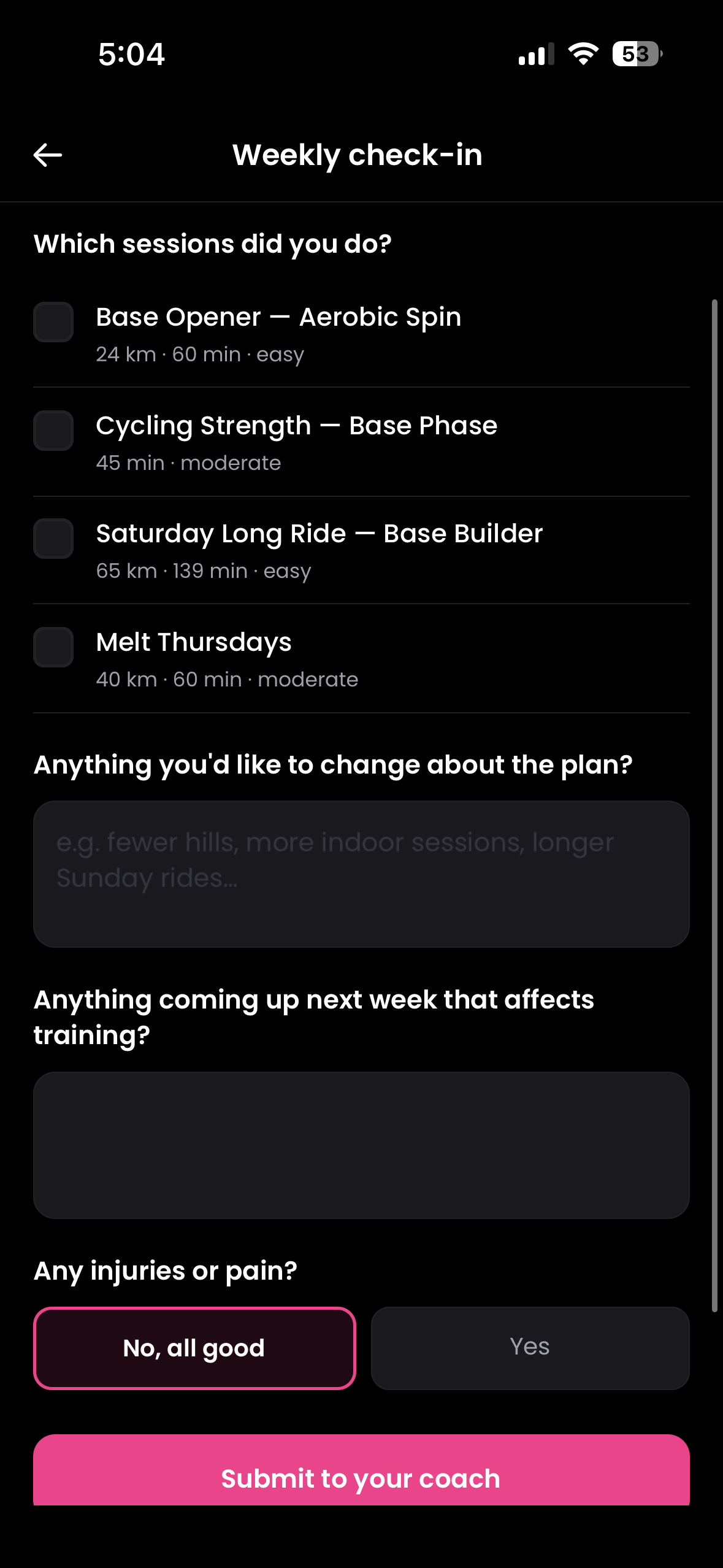
Once a week your companion asks how things actually went. You tick what you did, drop one line about anything coming up ("can't ride Wednesday"), and the companion proposes concrete tweaks to next week — apply or skip each one with a tap. Whatever you wrote after each ride this week is shown back to you in the check-in (pink "YOU SAID" pill under each session) so you don't retype the same thing. Your companion reads it as structured data and quotes you directly when suggesting tweaks ("you marked Tuesday way too hard" not "I see you struggled").
Tap done after any session and a quick popup asks effort, feel, and an optional note — your companion replies on the spot with one short response. Reschedule the check-in mid-week without skipping it, and pick the day and time in Settings → Weekly check-in. Anything injury-related gets pointed at a physio, full stop — your companion never gives medical advice.
Save events. Track them. Build a guide toward one with a tap.
A new home for everything you're aiming at. Save events with one tap, mark them as Considering / Registered / Training / Completed, and see them on your training calendar with pink dots on the day. From any event card you can build a training guide toward it (we prefill the intake from what we already know) or open an event-specific companion chat where the companion knows what you're preparing for and answers in that context.
Pre-event nudges fire 14, 3, and 1 day out; a "how did it go?" prompt lands the day after. Calendar markers, a dedicated My events screen, and quick filters (this month / upcoming / completed) so you always know what's next.
If cycling isn't your only sport, the guide should know that.
A new step in the onboarding flow — and a permanent About me + Regular weekly sessions pair in Settings — lets you tell us who you actually are. "Competitive rower — cycling is recovery and base." "CrossFit four days a week, riding to keep my legs honest." "Newcomer, just want to enjoy easy rides." Whatever you write goes to the guide generator and the weekly check-in companion so the cyclist-first defaults bend to fit, instead of fighting your other training.
Add the recurring non-cycling sessions you don't want the guide to clash with — Tuesday rowing, Wednesday cricket, Friday morning gym — and the planner schedules around them automatically. Optional, skippable, comes back any time from Settings. Nothing leaves the device until you confirm.
Cyclist-friendly gym sessions — log a weight once and we'll show you last time's number on every set.
Strength days spell every exercise out: sets, reps, target rest, target RPE, and a per-set weight log. Log a goblet squat once and the next session greets you with "Last time: 32 kg × 8" on every working set. A built-in rest timer counts you down between sets (90s default, ±15s buttons), a progression nudge flags exercises that felt easy last time and suggests the next jump, and an equipment picker lets you tell us what kit you actually have so the sessions only ever ask for it.
Don't have a barbell today? Tap Swap exercise for a kit-light equivalent. A Top lifts screen ranks your strongest estimated 1RM per movement (Epley formula across every set you've logged) so you can watch the numbers actually climb. Sessions are written for cyclists — glutes, posterior chain, core, single-leg balance — not generic gym routines.
One short clip. We look at your back, hands, and head — and tell you what to soften.
The posture check is a lighter, faster cousin of the bike fit — designed for "I think I'm slumping" rather than "I'm in pain." Record a five-to-ten second clip on a turbo or with a friend holding the phone. We pull a few frames, read your back angle, hand pressure, and head/neck posture, and write up plain-English notes you can act on next ride. Best paired with a bike fit if you're new to a bike, or run on its own when you change something (saddle, bars, cleats) and want a sanity check.
Like the bike fit, a short YouTube primer sits above the upload so you know what we're looking at, and the routine is remote-configurable so we can swap the explainer without an app update.
Wash, M-check, major service — short walkthroughs, attributed to the right bike.
A 7-step bike wash and a 7-point pre-ride M-check, both written for a beginner with basic kit. Each step has a "why this matters" line, a "what to watch for" line, and a tap-to-tick affordance so you can work through them on the bike. Don't have all the kit? An expandable shopping panel surfaces curated gear (chain lube, degreaser, track pump, multi-tool) with affiliate-linked buy buttons. A short YouTube video at the top of each walkthrough shows the routine done before you do it yourself.
Add every bike you own (road, gravel, MTB, e-bike, indoor) and pick which one a wash or M-check counts against from the routine itself. The home carousel reads "Gravel bike — wash overdue" instead of generic "Wash overdue", and per-bike push reminders fire so a clean road bike doesn't suppress a reminder for the gravel bike that hasn't been cleaned in a month. A new Major service walkthrough sits alongside Wash and M-check with cadence guidance, warning signs, and a "find a shop near me" Maps link.
Your kit, your bike, your nutrition — what you have, what to get, where to get it.
An honest, no-jargon checklist of everything a beginner cyclist actually needs — bike, helmet, lights, shorts, gloves, eyewear, food, tools, tech, community — across nine grouped sections with three tiers each (charity shops and Marketplace get airtime alongside the big retailers). Tick off what you have. We surface buy-links where it makes sense, region-aware: UK riders see British Cycling, Tredz, and Decathlon; US riders see REI and Bikes Direct.
The maintenance and cleaning kit gets the same treatment — a Muc-Off cleaning starter pack, lube, brushes — so the gear walkthroughs flow naturally into "and here's where to get it." A small inline nudge in the home carousel keeps an eye on what's still on your list and reminds you in a non-pushy way.
Quiet improvements worth a line
- Roadside AI mechanic, with videoTap what's wrong (flat / chain off / brakes / strange noise) and the AI mechanic walks you through diagnosis in plain English, attaching a short inline YouTube clip for common fixes. The mechanic also reads photos now — snap the chain or the wheel and it'll diagnose with what it can actually see, not just what you typed.
- Flexible schedulingGuides now support "fixed" or "flexible" mode. Flexible commits you to N rides a week and lets you drag them onto days as the week unfolds, instead of forcing a Tuesday-Thursday-Sunday rhythm on every rider.
- Smarter companion contextYour companion now sees today's date, what you did over the last 14 days, and what's coming up over the next 14 — so it won't congratulate you on a session you haven't done yet, or refer to next Tuesday's threshold ride as if it's already happened.
- Settings reorganisedMaps app picker (Apple Maps / Google Maps / Citymapper / Komoot — auto-detected from what you have installed), richer location picker that takes lat/lng for proper local-shop lookups, and the long-overdue grouping of related rows.
- Onboarding tourThe first-run tour now includes a "what else is here" primer covering calendar, find-an-event, bike fit, posture check, maintenance, strength tracker, and Cycling sorted; plus a country picker so the companion can be region-aware from day one.
- Short YouTube explainersInline videos at the top of the posture, M-check, wash routine, and bike-fit screens — see the routine done once before working through it yourself. Remote-configurable, swappable without an app update.
- Find-a-physioFor niggles the bike fit can't solve, a curated list of sports physios with cycling experience near you (not generic high-street clinics). Costs are now driven by an admin-editable table with a sensible UK fallback so non-UK riders no longer see "£40–80" as if it's a global figure.
- Search-by-name in eventsAlready know the event you want? Type "Manchester to Blackpool 2026", get the date and source filled in, add to your calendar.
- Per-metric prefs nudgeThe "add your max HR or FTP for real numbers" nudge fires when only one is missing, not both — setting one no longer silently leaves the other rendering as percentages.
- Sign-in redesignPared back to logo + tagline + Apple/Google buttons. Tagline: "Bringing cycling to everyone."
- Affiliate disclosureSettings → About now carries the formal "As an Amazon Associate Etapa earns from qualifying purchases" line, plus an inline "affiliate link" caption on every gear card.
- Cross-device persistenceGear list, location, units, opted-out companion tips, and unavailable days now follow you across reinstalls and platform switches.
- Back-button accessibilityEvery text-arrow back button now has an accessibility label, so screen readers announce "Back, button" instead of "left arrow" or nothing.
- Android keyboard no longer covers the input on chat-style screens — KeyboardAvoidingView now resizes the layout instead of leaving the OS to guess.
- "Use my location" on Find-a-goal no longer silently fails when reverse-geocoding can't find a place name; falls through to a Nominatim lookup, then a friendly "type it in" prompt — never bare coordinates.
- Splash → loader transition is no longer jolty. The JS loader now renders the same splash.png the OS shows so the icon never jumps.
- "Try different answers" on Find-a-goal actually pre-fills the seven questions with what you said last time. Tweak one, re-run.
- "How to do this session" no longer silently fails — surfaces an actionable error message when the AI breakdown can't load, with a retry.
- Strength activities with a corrupt or legacy structure now regenerate the breakdown instead of crashing the screen.
- Roadside chat video cards play inline via a privacy-enhanced embed instead of bouncing out to the YouTube app.
- Equipment picker slides up properly to match its grab-handle — was fading in and out, which made the gesture feel wrong.
- Bike-fit / posture screens lost a noisy posture-zones overlay and gained a clean YouTube embed of the routine.
- Home carousel slim banner now renders in brand pink — a duplicate stylesheet entry was overriding it with the surface colour.
- The yellow "expo-file-system getInfoAsync deprecated" warning that was rendering on the bike-fit upload screen is gone.
- Companion reply badge clears the moment you tap into chat instead of waiting for the next focus refresh.
- Workout export no longer leaks raw deprecation warnings into the user-facing error. Friendlier copy, deprecation silenced.
- Paywall dismissed after a fresh guide generation now lands on Home with a loading splash, instead of flashing the "Get started" empty state for half a second.
A weekly check-in that already knows what you said. Save your workout file inside the app. Pick the bike that fits your riding. Block out days. See companion changes before they apply.
Weekly check-in
Updated
Two minutes on Sunday — your guide reshapes itself for next week, with what you said after each ride already in there.
Two minutes on Sunday — your guide reshapes itself for next week, with what you said after each ride already in there.
Once a week your companion asks how things actually went. You tick what you did, drop one line about anything coming up ("can't ride Wednesday"), and the companion proposes concrete tweaks to next week — apply or skip each one with a tap.
Whatever you wrote after each ride this week is shown back to you in the check-in — pink "YOU SAID" pill under each session — so you don't retype the same thing. Your companion reads it as structured data and quotes you directly when suggesting tweaks ("you marked Tuesday way too hard" not "I see you struggled").
- Tap done after any session and a quick popup asks effort, feel, and an optional note. Your companion replies on the spot with one short response, and you can jump into chat to dig in further.
- Each session row shows its calendar date so you can place it in the week.
- "Reschedule" pill in the header — push the check-in to a later day mid-week without skipping it entirely.
- Pick the day and time in Settings → Weekly check-in.
- Your companion never gives medical advice. Anything injury-related gets pointed at a physio, full stop.
Send to your trainer
Updated
Save the workout file inside Etapa — read it, share it where you ride, no browser kick-out.
Save the workout file inside Etapa — read it, share it where you ride, no browser kick-out.
Open any structured ride and tap Send to trainer. We download a real .zwo workout file straight into Etapa — no browser, no Files-app dance. The modal shows exactly what's in your workout: warm-up, main set with target zones, cool-down, all with durations.
From there a single Share button opens the system share sheet on the local file. Pick Zwift, Rouvy, Wahoo SYSTM, intervals.icu, Files, AirDrop, Messages — whatever fits how you ride.
- The file lives inside Etapa permanently. Re-share it any time without re-downloading.
- Format auto-picked: .zwo for Zwift / Rouvy / intervals.icu, .fit for Wahoo SYSTM.
- FTP set in your trainer app once → every workout plays back at the right watts.
Cycling type
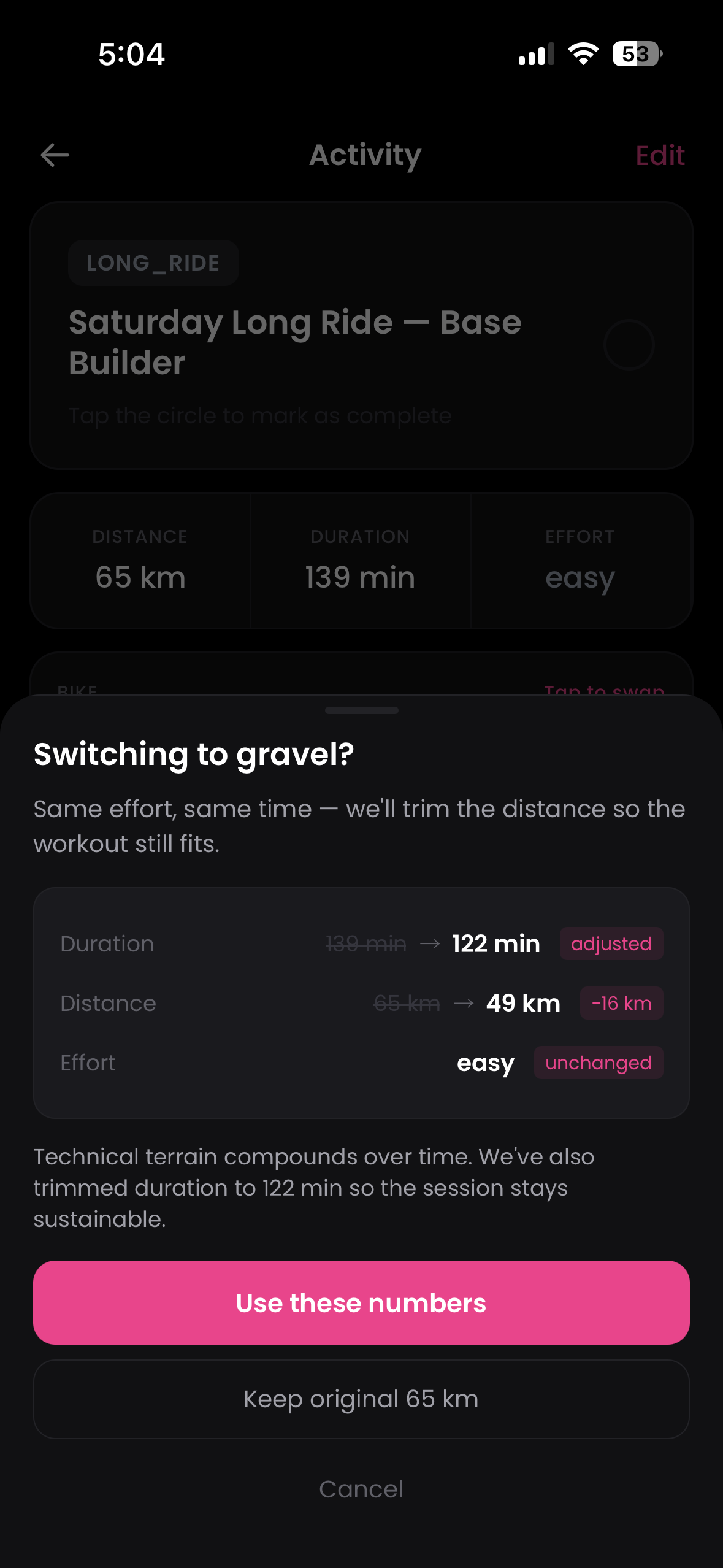
Pick the bike that fits your riding — swap any session in one tap.
Pick the bike that fits your riding — swap any session in one tap.
Pick the one that defines your training and the guide reads native to it (singletrack for MTB, mixed surface for gravel, structured indoor for trainer riders).
- Tap the bike chip on any ride to swap just that session — same effort, sensible distance.
- Changing every Thursday to gravel? It'll offer to apply across all upcoming weeks.
- Change your default any time in Settings → Companion → Default cycling type.
Calendar
Block out days, see companion changes before they apply.
Block out days, see companion changes before they apply.
Heading away for work? Tap "Mark unavailable" in the calendar header, pick the days, drop a one-line reason. Hatched cells make it obvious those days are off-limits, and the planner routes around them.
When your companion proposes changes for next week, they show as a diff on the calendar — added sessions in pink with a left border, moves marked "MOVED FROM SAT", removals struck through. Apply all in one tap, review them one-by-one, or skip.
- "See on calendar" from a companion chat message lands you on the exact date the change applies to, day-detail panel already open.
- Holds work travel, family weekends, scheduled rest — all handled the same way.
Quiet improvements worth a line
- Weekly summary you can actually shareRight after the check-in, get a card of your week — km, sessions, longest ride, 4-week trend, a quote from your companion — and tap Share to send it anywhere or save it to Photos.
- Ride tip on every sessionEach ride opens with personalised warm-up, fuel, pacing, cool-down, and recovery tips written for that exact session.
- Companion proposes changes inline in chatWhen your companion says "I'll move that long ride", the message embeds a structured add / move / remove card with Apply and See on calendar buttons.
- Mark-as-done feels instantThe feedback popup opens the moment you tap, with a "Saving your ride…" banner while the round-trip lands. No waiting before you start typing.
- Per-session companion chatOpen the companion from a ride and the conversation stays scoped to that session.
- Honest about weatherThe placeholder weather hint that lived under ride tips is gone — we'll add it back when there's real weather data, not before.
- Default cycling type now in CompanionMoved out of Notifications (where it never belonged) and lives next to Change Companion, where it fits the conversation.
- Kinder formsRecurring rides, longest-ride input, event details, and the check-in textarea all behave properly above the keyboard now.
- Companion chat no longer fires "timed out" while Claude is still working — client cap raised to outlast the server's 180s call, and the error message tells you the actual duration.
- Reschedule + ride-tip routes are now actually wired server-side — both used to silently no-op when the client tried to call them.
- Accepted companion changes always show on Home now — the cache check that used to short-circuit on identical activity counts is gone.
- The check-in's text input no longer hides under the keyboard mid-type.
- Completed-session check colour is unified across Week, Home, Calendar, and the today-hero badge — pink everywhere now.
- App opens no longer fire phantom "new sign-up" notifications for existing users.
- Bike chip is hidden on strength sessions (where swapping a bike type makes no sense).
- Activity-detail edits round-trip through the server, so swaps stick on every device.